Can AI Restore Old Videotapes? How Does It Work? Learn About the Best AI Tools!

Videos carry precious memories. Whether they’re old family gatherings captured on analogue tapes or early digital footage, these videos can become difficult to view over time due to physical damage, degraded image quality, or outdated formats. Restoring videos not only revives those memories but also converts them into modern digital formats for easier preservation and sharing. With the rapid advancement of artificial intelligence (AI), video restoration has become more efficient and user-friendly—even non-professionals can now restore old footage with ease. This article will explore when video restoration is needed, how AI is used to restore aging tapes, step-by-step methods, and the top AI video restoration tools worth trying.
When Is Video Restoration Necessary?
Common scenarios requiring video restoration include:
Degradation of old tapes: Analogue formats like VHS and Betamax may deteriorate over time, causing tape wear, visual noise, or colour distortion, resulting in poor or unplayable footage.
Quality issues with early digital videos: Early camcorder or phone footage often suffers from low resolution (e.g. 480p or below), compression artifacts, or poor lighting, making it appear blurry or grainy.
Physical damage: Tapes may be broken, mouldy, or stuck together due to improper storage (e.g. humidity or heat), affecting playback.
Outdated formats: Older formats like AVI or WMV may no longer be compatible with modern devices and require restoration and conversion to MP4 or other common formats.
- Audio-video sync or data loss: Some videos may suffer from out-of-sync audio or damaged segments due to recording or conversion issues.
In these cases, video restoration becomes essential for memory preservation and improving viewing experience. The emergence of AI technology has made the restoration process simpler and more effective.
Can AI Restore Old Videotapes?
Yes—AI has shown great potential in restoring old videotapes, especially in addressing the degradation commonly seen in analogue formats. Here are the key advantages:
Image enhancement: AI uses super-resolution technology to upscale low-resolution videos (e.g., 240p from VHS) to HD (1080p or even 4K), restoring detail and reducing noise.
Colour correction: AI algorithms can analyse faded or distorted footage and automatically adjust colour balance, restoring natural tones. For example, DVDFab Enlarger AI enhances vividness in old tapes.
Noise/artifact removal: Common issues like snow noise, scratches, or compression artifacts can be removed effectively by AI de-noising features to produce a clean image.
Damaged footage repair: Using generative models (like GANs), AI can reconstruct missing or corrupted parts of the video based on context, ensuring continuity.
- Audio enhancement: AI can clean up background noise, reduce distortion, and fix broken audio to improve clarity and restore proper sync.
While AI may not fully recover severely damaged tapes (e.g. broken or completely unreadable ones), for digitised tapes, AI significantly enhances both visual and audio quality for modern playback.
How to Use AI to Restore Videotapes
Here’s a typical process for restoring old tapes using AI:
Digitise the Tapes
- Use a VHS player and a video capture device (e.g., Elgato Video Capture) to convert the footage to a digital format (such as MP4).
- Make sure the tape and equipment are clean to avoid damage during conversion.
- For damaged tapes, consider professional repair before digitisation.Choose an AI Restoration Tool
- Use downloadable or online AI software like DVDFab Enlarger AI, Topaz Video AI, or MyEdit.
- Select tools that offer the features you need—upscaling, de-noising, or colour correction.Upload and Restore
- Upload the digitised video to the AI tool and choose a restoration mode (e.g. de-noise, super-resolution, or colour correction).
- Adjust parameters (e.g. sharpness, de-noise strength), or use automatic optimisation.Preview and Refine
- Review the output video; adjust settings or re-process if necessary.
- Ensure audio and video are in sync; use built-in audio repair if needed.- Export and Save
- Export the video in high resolution (e.g., 1080p or 4K).
- Save it to the cloud or external storage for long-term preservation.
Tips:
- Store original tapes in cool, dry conditions before digitising to avoid further damage.
- Use high-quality capture hardware to retain original detail.
- Check each tool’s licensing and usage terms to ensure compliance with restored footage.
Recommended AI Video Restoration Tools
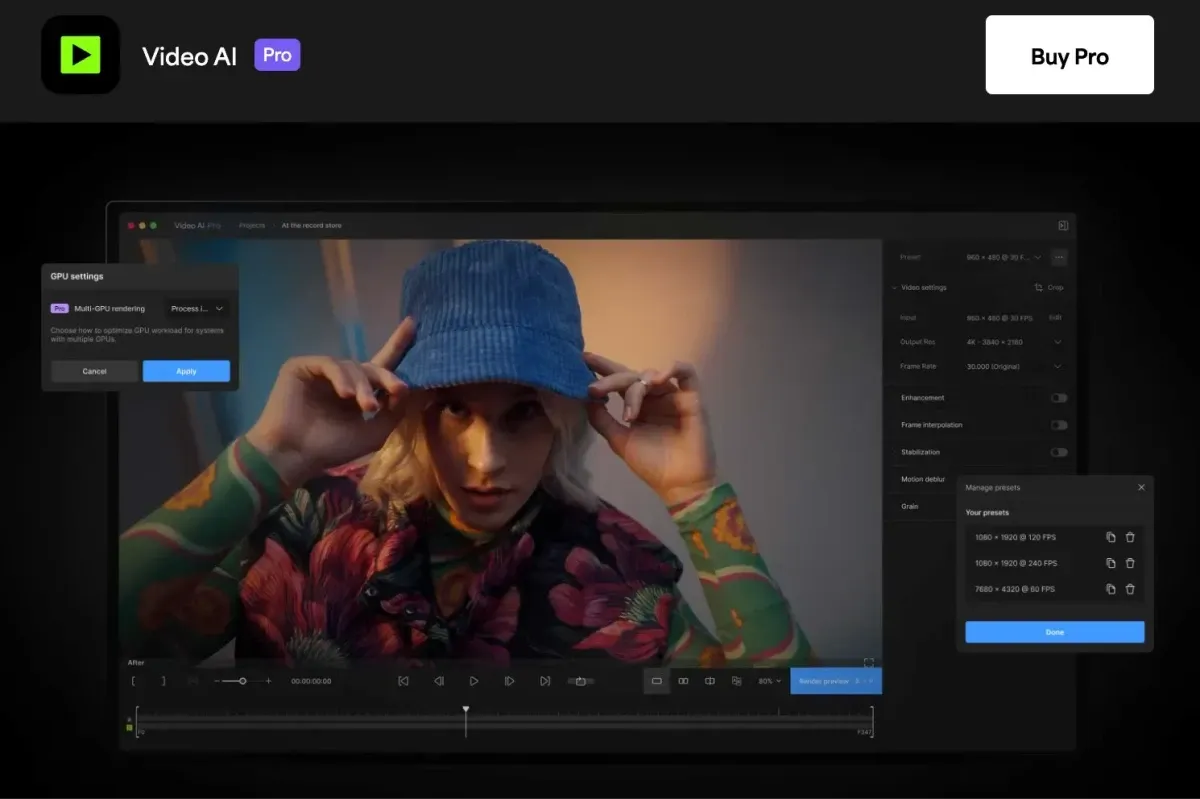
There are various AI video restoration tools available on the market, including both free and paid options, catering to different user needs. Below is a list of recommended tools:
DVDFab Enlarger AI
- Features: Industry-leading AI software for upscaling low-res videos to 4K with automatic de-noising, sharpening, and colour correction.
- Strengths: Natural results, batch processing, ideal for VHS and early digital footage.
- Price: Free trial available; full version ~USD $99.
- Platforms: Windows, Mac.Topaz Video AI
- Features: Professional-grade software focused on super-resolution and artifact removal, using models like Artemis and Gaia.
- Strengths: High-precision results, supports up to 8K, ideal for professionals.
- Price: ~USD $299 (one-time license).
- Platforms: Windows, Mac.MyEdit
- Features: Free web-based tool offering quality enhancement, de-noising, and colour correction for light restoration needs.
- Strengths: No download needed, beginner-friendly.
- Limitations: Output resolution limited in free version; advanced features require payment.
- Platforms: Web.HitPaw Video Enhancer
- Features: User-friendly software for one-click enhancements, de-blurring, and restoring old footage.
- Strengths: Supports various formats, suitable for families and casual users.
- Price: Free trial; plans start at USD $39.99/month.
- Platforms: Windows, Mac.- VapourSynth (with AI plugins)
- Features: Open-source video processing framework with support for AI plugins (like ESRGAN) for high-end restoration.
- Strengths: Free and highly customisable, suitable for tech-savvy users.
- Limitations: Requires technical knowledge for setup and use.
- Platforms: Windows, Linux, Mac.
Preserve Your Precious Memories with Capture’s Photo Album Digitisation Service
Do you have a box full of old photographs, worried that they may fade or get damaged over time? Now, you can preserve these treasured memories by digitising them with Capture.HK’s professional photo album digitisation service. Our service allows you to convert your old photos into high-quality digital files, ensuring they are safely stored and easily shareable.
At Capture.HK, we use high-resolution scanning technology to restore your photos with sharp details and vibrant colours, maintaining their original quality. We also offer various file formats, making it easy for you to access and share them across different devices. Most importantly, we handle your photos with utmost care, ensuring they are safely processed and preserved.
The Frame Digital Photo Frame
Want to relive your digital memories every day? Capture’s The Frame digital photo frame is the perfect solution! Designed to showcase your most cherished moments, The Frame allows you to display a lifetime of memories in one elegant frame.
With its sleek design and high-resolution display, The Frame offers an effortless way to organise and enjoy your favourite photos. Simply digitise your photo collection, upload them to The Frame, and enjoy your memories anytime, anywhere.
Whether placed in the living room, bedroom, or office, The Frame adds a touch of warmth and personality to your space. More than just a decorative item, it’s a meaningful gift that brings your treasured moments to life.
Get The Frame today and enjoy your memories every day!
References: