【Google Photos Tutorial】New Year's Cleaning, Clean Up Your Google Photos Storage

It is time to clean out your home and get rid of all the clutter and dirt to bring in good health and prepare for the new year. Let Capture.HK show you how to clean up your Google Photos storage space more easily.
Composition of storage space in your Google account
Google accounts take up different types of storage space, such as the following:
- Google Drive: Most files take up storage space, for example, PDFs, videos and photos.
- Emails: Emails and attachments, including items in the 'Spam' and 'Trash' folders also take up storage space.
- Google Photos: Photos and videos that are backed up take up storage space. Photos and videos are not counted as storage space in your Google account unless they are backed up in "original quality" and "compressed quality" before 1 June 2021.
If your Google account storage space is full, you will not be able to send emails to Gmail, or create new files and upload new files to Google Drive. Also you will no longer be able to back up photos or videos on Google Photos. And if you use Google as a tool to back up WhatsApp, it will stop backing up when you run out of storage space, making it easy to lose your conversations and photo memories. In addition, Google Photos will stop being uploaded automatically.
Everyone likes to take a quick snap and Google Photos will automatically sync your photos and videos, so Google Photos can take up more space. So Capture.HK will show you how to clean up your Google Photos storage space and clean up your mobile phone photos.
How to clean up your Google Photos storage space
First check if you have enough storage space left in Google Photos, then you can choose to compress the quality of your photos to free up storage space.
How to check your Google Photos storage space
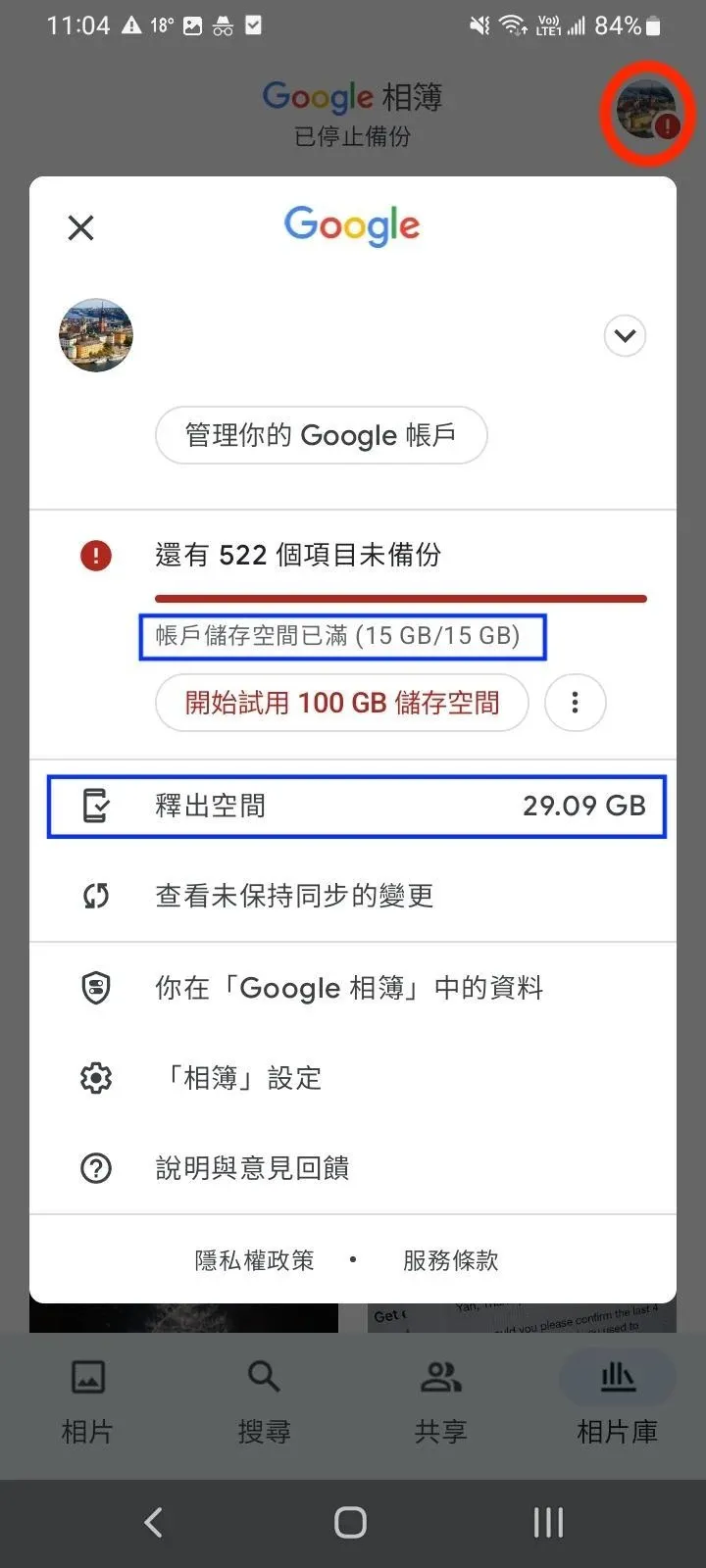
You can click on your profile image (in red) to see how much space you have left in Google Photos. If your Google account is full, as in the image below, the words "Account storage is full" will appear, Google has 15GB of free space and when your storage is full you can choose to "free up space" or buy space. Here are some steps to help you prioritise the useless files you need to clear out of your cluttered account.
Choose "Compressed Quality" as backup quality
Users can choose whether they want to upload to Google Photos in "original quality" or "storage saver" depending on your needs. The Google One storage management tool shows the items in the trash that take up space, as well as large items such as documents, photos and videos, so it is more efficient to clear large files first. The photos and videos in Google Photos take up more space and the difference in file size between 'original quality' and ‘storage saver’ is huge, so we recommend choosing 'storage saver'. If you are using "Original Quality", you can use the "Free Up Space" to change your saved files to "storage saver", which can save a lot of space.
Make the most of Google Photos smart tools/techniques
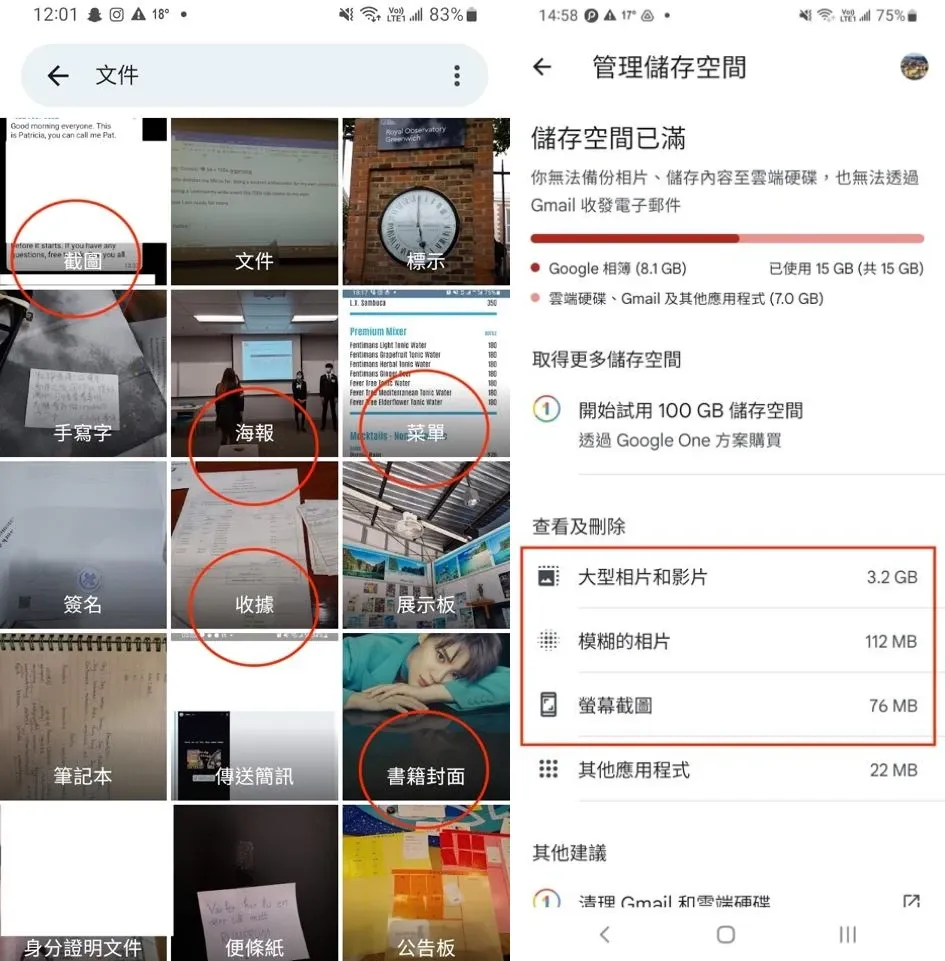
Google Photos displays different categories such as documents, screenshots, posters, menus, receipts, notes, memos, recipes and more. Most people forget that they are uploading useless photos to Google Photos, which takes up a lot of space. Start by organising screenshots, receipts, notes or other categories of items that you don't use often, and you can clear up a lot of space. In addition, you can select 'Large photos and videos', 'Blurry photos' and 'Screen shots' in Manage Storage. Google will identify the three types of media that tend to run out of space and you can delete items in these three categories as a priority.
Buy Google Storage
If your Google Photos storage is still full, you can get more space by upgrading your Google storage. 100GB of Google Space is $15 per month or $150 per year. 200GB would be $23 per month or $230 per year. 2TB would be $79 per month or $799 per year.
More recommendations and information on cloud photo albums can be found in our blog: Comparing the Top 7 Online Photo Album Apps
Clean up and organise your storage space
It's an annual tradition to clean up your Google account, but don't forget to clean it up every year to keep your account organised and increase your usage and storage space. Protect your precious memories by uploading more photos and videos to Google as you take them.
Digitise analogue media and free up home storage space
Capture.HK offers a professional digitisation service that allows you to digitise all the photo albums, photographs, videotapes and digital media you find at home, while Capture is a partner of Google Photos, allowing you to upload your digitised media to Google Photos. Click here to learn more about Capture.HK analogue media digitisation products.