Kling AI: Pros, Cons & Subscription Pricing (with Tutorial and Alternatives)
Introduction to Kling AI
Kling AI is a next-generation AI video and image generation platform developed by China’s tech giant Kuaishou. Its standout feature is the seamless integration of text-to-video and image-to-video technologies. No filming or editing experience is required—users simply enter a brief text prompt or upload an image, and Kling AI automatically produces high-quality, physically realistic short videos.
The platform supports multiple languages and a variety of output formats (including 960×960 square and 720p landscape or portrait). It also offers customizable controls—adjustable “creativity” and “relevance” sliders and negative-prompt inputs—to suit a wide range of creative scenarios in business, marketing, education, and social media. Unlike traditional video tools, Kling AI dramatically lowers the barrier to entry, enabling even beginners to create dynamic, professional-looking, and highly creative short films.
Pros of Kling AI
- User-Friendly & Beginner-Friendly
Just type a text prompt or upload an image—Kling AI handles scene creation, character movement, and editing automatically. The intuitive interface means you’re ready to go as soon as you register. - Powerful Generation Capabilities
Supports hyper-realistic human motion, physics-based effects, dynamic camera moves, and multi-subject interactions—delivering near-cinematic short videos. - Fast & Efficient
Generate a 5–10 second clip in just 5–15 minutes, outperforming many competitors. Perfect for tight deadlines and high-volume content production. - Multi-Language & Format Support
Enter prompts in multiple languages and choose from various aspect ratios (square 960×960, 720p landscape or portrait) to suit platforms like Instagram, Xiaohongshu, TikTok, and YouTube. - Flexible Creativity & Customization
Adjust “Creativity” and “Relevance” sliders; use negative prompts to exclude unwanted elements. The Motion Brush tool lets you animate specific parts of an image by drawing custom motion paths. - Free Trial & Flexible Pricing
Free users receive daily credit; paid plans offer clear upgrade paths so casual creators and power users alike can find the right balance of credits and features. - Consistent Visual Quality
Delivers impressively realistic visuals for ads, commercial shorts, and social-media content, ensuring every video looks polished and professional.
Cons of Kling AI
- Resolution & length caps
Free/basic plans max out at 10 sec—longer or higher-res videos require an upgrade. - Not the fastest
Quicker than many AIs, but trails top-tier Sora/Veo for high-quality renders. - Watermarks & feature limits
Free videos include watermarks; advanced camera moves/editing gated. - Occasional motion glitches
Complex interactions and frame-to-frame coherence can still look synthetic. - Registration hurdles
Chinese version requires a mainland phone number; international users must use email. - Pro features paid only
Professional mode, priority queues, advanced camera controls locked behind paywall.
2025 Subscription Pricing for Kling AI
Kling AI offers flexible pricing plans. Below are the common 2025 plans (international pricing):
| Plan | Monthly Fee (USD) | Credits per Month | Watermark | Speed | Key Features |
| Basic | $0 | 66/day | Yes | Standard | Limited image |
| Standard | $6.99~10 | 660 | No | Accelerated | High-quality image/video |
| Pro | $24~37 | 3,000 | No | Pro Queue | Priority channels, new features |
| Premier | $60~92 | 8,000 | No | Fastest | Team collaboration, high-freq |
- Free users receive daily credits; paid tiers grant monthly credits for video/image generation.
- Upgrade to Standard+ to remove watermarks and access HD output.
- Additional credits can be purchased anytime; all paid plans are cancel-anytime.
Beginner’s Tutorial for Kling AI
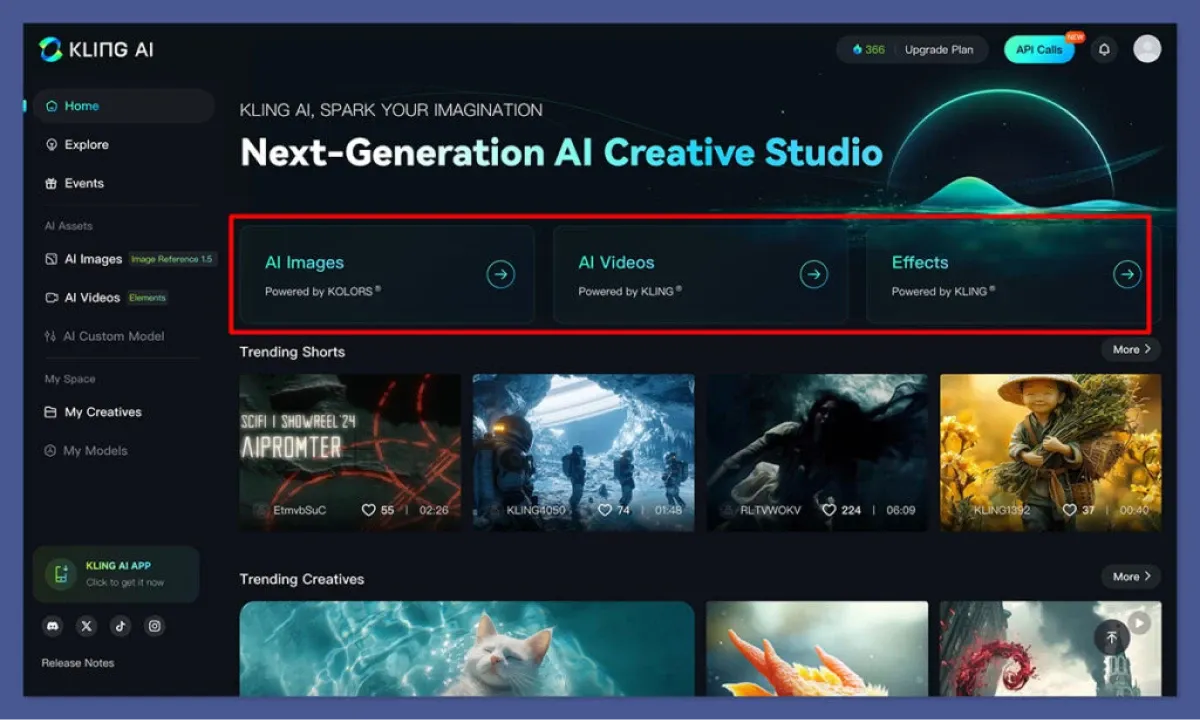
1. Register an Account
International users: email or Google; Chinese users: mainland mobile number.
2. Choose a Creation Mode
- Text-to-Video: enter English/Chinese prompts.
- Image-to-Video: upload an image + prompt.
- Motion Brush: draw movement paths on image areas for custom animation.
3. Enter Prompts & Parameters
- Be specific for best results.
- Adjust “Creativity” & “Relevance” sliders; use negative prompts to filter out undesired content.
4. Select Mode & Quality
- Standard: faster, great for beginners.
- Professional: best quality & dynamic camera moves (paid users only).
5. Preview & Download
- Watch your clip, then download watermark-free HD export (paid plans).
6. Tips & Resources
- Credits auto-replenish daily, or purchase more.
- Visit the FAQ and tutorial videos on the Kling AI site for deeper learning.
Alternatives to Kling AI (2025)
In 2025, the AI video-generation market is packed with powerful tools. Here’s a comparison of several leading alternatives:
| Brand | Strengths | Weaknesses | Starting Price (USD) |
| OpenAI Sora | Cinematic quality, strong narrative AI | Expensive, whitelist application | $20+ |
| Runway | Versatile styles, high creative freedom | Paid advanced features, limited credits | $12 |
| Google Veo | 4K output, smooth motion, physics sim | High cost, invite-only early access | $19.99+ |
| MyEdit | Generous free tier, lightweight & flexible | Limited advanced features | $0 |
| D-ID | Expert face animation & photo-to-video | Short clips only, focus on static to motion | $5.99 |
| DeepBrain AI | Fully automated text-to-video, multi-lang | Motion naturalness needs improvement | $30 |
| Kling AI | Excellent physics-driven motion, low cost, highly flexible | Limited resolution support, short maximum clip length | $6.99 |
Quick guidance:
- For lip-sync, physics realism & custom animation: Kling AI offers best value.
- For cinematic storytelling or long-form content: consider Sora or Google Veo.
- For social media and light-weight edits: Runway, MyEdit, or D-ID are solid picks.
Preserve Your Precious Memories with Capture’s Photo Album Digitisation Service
Do you have a box full of old photographs, worried that they may fade or get damaged over time? Now, you can preserve these treasured memories by digitising them with Capture.HK’s professional photo album digitisation service. Our service allows you to convert your old photos into high-quality digital files, ensuring they are safely stored and easily shareable.
At Capture.HK, we use high-resolution scanning technology to restore your photos with sharp details and vibrant colours, maintaining their original quality. We also offer various file formats, making it easy for you to access and share them across different devices. Most importantly, we handle your photos with utmost care, ensuring they are safely processed and preserved.
The Frame Digital Photo Frame
Want to relive your digital memories every day? Capture’s The Frame digital photo frame is the perfect solution! Designed to showcase your most cherished moments, The Frame allows you to display a lifetime of memories in one elegant frame.
With its sleek design and high-resolution display, The Frame offers an effortless way to organise and enjoy your favourite photos. Simply digitise your photo collection, upload them to The Frame, and enjoy your memories anytime, anywhere.
Whether placed in the living room, bedroom, or office, The Frame adds a touch of warmth and personality to your space. More than just a decorative item, it’s a meaningful gift that brings your treasured moments to life.
Get The Frame today and enjoy your memories every day!
References:
- We tested out the 13 best AI video generators for creatives - lummi
- I've spent 200 hours testing the best AI video generators — here's my top picks - tomsguide
- 13 Best AI Video Generators to Use - hubspot
- The 11 best AI video generators in 2025 - zapier
- Explore Kling AI: An In-Depth Look at Kling 2.1 Standard and Kling 2.1 Professional Editions – videoweb
- klingAI
Extended Readings:
Loading...