Runway AI: Pros, Cons & Subscription Pricing (with Tutorial and Alternatives)
Introduction to Runway AI
Runway AI (also known as Runway ML) is a leading AI video-generation and editing platform favoured by professional filmmakers and creators in 2025. It leverages the latest Gen-series AI models to support multi-dimensional workflows—from images and text prompts to fully edited videos—producing short films with a cinematic look and high creative flair. Positioned as a professional-grade tool with extensive customisation, Runway not only generates videos but also offers deep image editing, lighting adjustments, and precise camera-motion controls, making it ideal for video editors, artistic creators, and freelancers.
Unlike many competitors, Runway puts a strong emphasis on fine-tuning every detail—push-in/pull-out camera moves, motion-path design, layered compositing, and realistic light and shadow effects—ensuring each output truly feels cinematic. While the learning curve is steeper, its flexibility allows anyone with a technical background or the desire to learn to craft diverse, professional-quality content. A free tier gives you a limited number of credits to explore its capabilities, with paid upgrades required once those credits run out.
Pros of Runway AI
- Cinematic-quality video generation: Gen-4 AI turns images and detailed text prompts into smooth, professional videos with realistic motion and lighting.
- High creative freedom: Control push-in, pull-out, tilt, pan and other camera moves; adjust every visual parameter.
- All-in-one workflow: Integrates video generation with editing: trimming, colour correction, background removal, motion graphics and more.
- Fast turnaround: Generate a 5-second clip in under a minute—faster than most competitors.
- Multi-format support: Not only does it convert images and text into videos, but it also supports video-to-video effect enhancements and processing, covering a broader range of creative scenarios.
- Strong community & resources: Extensive tutorials and active user forums help new users learn advanced techniques quickly.
Cons of Runway AI
- No pure-text video generation on Free plan: You must supply a starting image; text-only workflows aren’t supported without credits.
- Limited free credits: The initial 125 free credits are easy to exhaust; you’ll need to plan usage or upgrade.
- Steeper learning curve: Its depth and flexibility demand more time to master than plug-and-play platforms.
- No one-click social-media effect templates: Viral effects (e.g., TikTok trends) require manual prompt design.
- Premium features behind paywall: Advanced camera controls, long-form output, and high-res exports need paid tiers.
- Occasional slowdowns or failures: Peak-time performance can lag and sometimes generate errors.
Runway AI Subscription Pricing
Below is an overview of Runway’s 2025 plans (all prices in USD):
| Plan | Monthly Fee (USD) | Monthly Credits | Key Features | Output Resolution |
| Free | $0 | 125 one-time | Basic video generation (image→video), limited editing tools | Up to 720p |
| Standard | $12 | 625 | Enhanced video generation, faster credit refresh, more processing | Up to 1080p |
| Pro | $28 | 2,250 | Priority generation, unlimited credits rollover, extra controls | High-quality exports |
| Unlimited | $76 | Unlimited | Unlimited video creation, fastest processing, team collaboration | Up to 4K+ (customisable) |
Credit usage varies based on video length, resolution, and complexity, and users can purchase extra credit packs for greater flexibility. Paid subscribers also enjoy faster generation speeds and dedicated customer support, making it ideal for high-volume commercial and film-production needs.
Beginner’s Tutorial for Runway AI
1. Sign Up & Log In
Register on Runway’s website with Email or Google; free accounts get 125 credits.
2. Create Your First Video
Since pure-text video isn’t free, first use “Text-to-Image” to generate a key visual, then apply “Image-to-Video.”
3. Enter Prompts & Adjust Settings
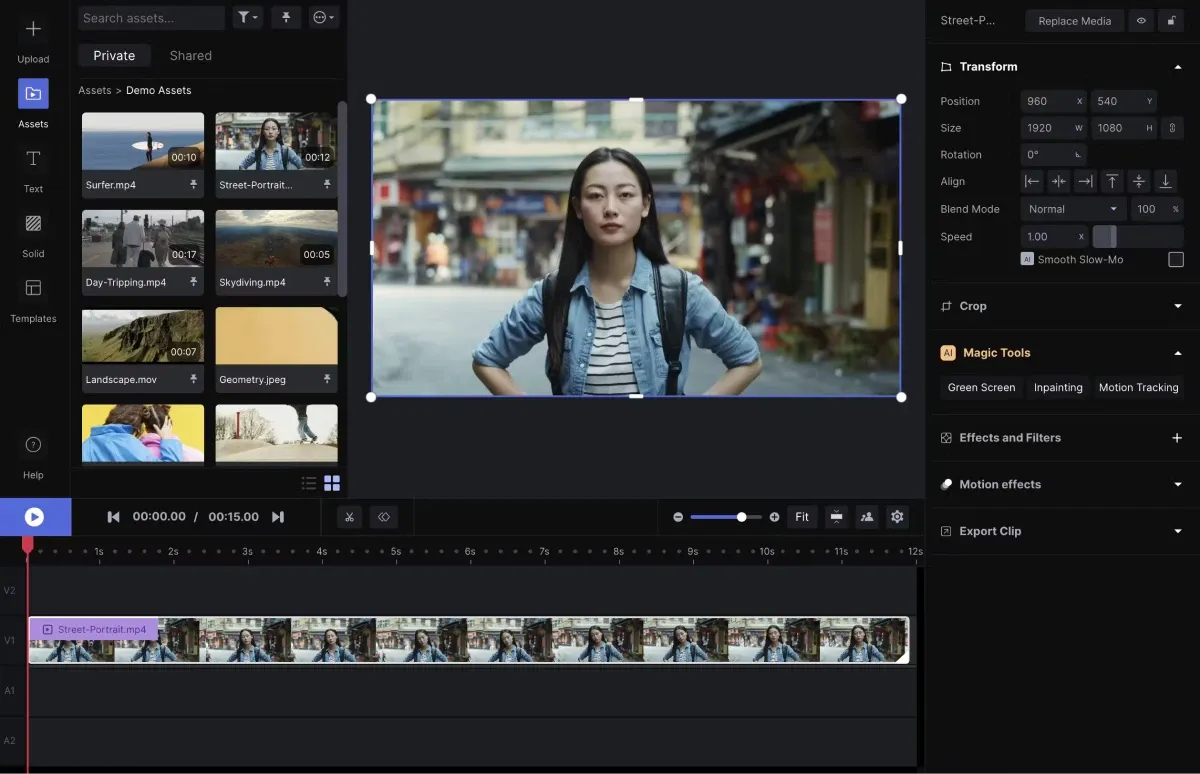
In the video tool, describe scene, mood, actions. Tweak camera moves, framing, lighting parameters.
4. Preview Generation
Watch a 4–5 second draft (takes ~50 seconds). If it matches your vision, proceed.
5. Post-Production Editing
Use Runway’s built-in editor for cuts, effects, colour grading, and watermarking.
6. Export & Iterate
Download the final video; experiment with alternate prompts or styles to produce multiple versions.
7. Upgrade & Purchase Credits
To remove limits or unlock HD/longer videos, upgrade your plan or buy extra credits.
Alternatives to Runway AI
In 2025, several other AI video platforms stand out:
| Platform | Highlights | Best For | Starting Price |
| OpenAI Sora | Film-quality output, strong story generation | Professional filmmakers, long-form | $20/month |
| Pika Labs | Simple interface, fast generation for social clips | Beginners, social creators | Free trial + paid |
| Kling AI | Realistic physics-based motion, cost-effective | E-commerce, ad & marketing videos | ~$7/month |
| Synthesia | Multilingual AI avatars, quick voice-over explainer | Corporate training, global brands | $29/month |
| Google Veo | 4K high-res simulation, smooth motion & effects | Animation studios, advanced users | $19.99+/min |
Recommendation: For high customisation and pro editing, Runway remains top-choice. For quick, low-barrier output, consider Pika Labs or Synthesia.
Preserve Your Precious Memories with Capture’s Photo Album Digitisation Service
Do you have a box full of old photographs, worried that they may fade or get damaged over time? Now, you can preserve these treasured memories by digitising them with Capture.HK’s professional photo album digitisation service. Our service allows you to convert your old photos into high-quality digital files, ensuring they are safely stored and easily shareable.
At Capture.HK, we use high-resolution scanning technology to restore your photos with sharp details and vibrant colours, maintaining their original quality. We also offer various file formats, making it easy for you to access and share them across different devices. Most importantly, we handle your photos with utmost care, ensuring they are safely processed and preserved.
The Frame Digital Photo Frame
Want to relive your digital memories every day? Capture’s The Frame digital photo frame is the perfect solution! Designed to showcase your most cherished moments, The Frame allows you to display a lifetime of memories in one elegant frame.
With its sleek design and high-resolution display, The Frame offers an effortless way to organise and enjoy your favourite photos. Simply digitise your photo collection, upload them to The Frame, and enjoy your memories anytime, anywhere.
Whether placed in the living room, bedroom, or office, The Frame adds a touch of warmth and personality to your space. More than just a decorative item, it’s a meaningful gift that brings your treasured moments to life.
Get The Frame today and enjoy your memories every day!
References:
- 2025’s Best AI Video Generator? Runway ML vs. Pika Labs Comparison – dicloak
- What Is Runway ML? Runway AI Tutorial & Gen-4 Video-Generation Highlights All in One – Cyberlink
- SORA vs. Runway vs. Kling AI: The Ultimate 2025 Video-Generation Showdown – gogoplus
- 8 Best Text-to-Video Tools for 2025: From Social Shorts to Commercial Ads, Easy to Master – inside
- Runway
- 2025’s Best AI Video Generator? Runway ML vs. Pika Labs Comparison – dicloak
- What Is Runway ML? Runway AI Tutorial & Gen-4 Video-Generation Highlights All in One – Cyberlink
- SORA vs. Runway vs. Kling AI: The Ultimate 2025 Video-Generation Showdown – gogoplus
- 8 Best Text-to-Video Tools for 2025: From Social Shorts to Commercial Ads, Easy to Master – inside
- Runway
Extended Readings:
Loading...