Synthesia AI: Pros, Cons & Subscription Pricing (with Tutorial and Alternatives)

Introduction to Synthesia
Launched in 2017, Synthesia AI has quickly become one of the world’s most popular AI video‐generation platforms. Its core advantage is that no professional camera or studio setup is needed. Simply input your text script, and the system automatically generates a professional‐quality video featuring a highly realistic AI avatar. Use cases include corporate training, education, marketing, product demos, social‐media shorts, and more. From Fortune 100 enterprises to startups and independent creators, everyone can flexibly produce multilingual, multi‐scene, multi‐format video content with Synthesia.
The platform supports over 230 AI avatars and can voice‐over in more than 140 languages and dialects, breaking down language and regional barriers. Users can customise avatar appearance, upload logos, adjust background visuals, and choose from 300+ built‐in templates to speed up production. Powered by text‐to‐speech (TTS) and deep‐learning AI, even those with zero editing experience can jump right in, greatly accelerating content creation while reducing cost.
Pros of Synthesia
- Ultra‐fast video generation:
Enter your script and instantly produce a lip‐synced video—no live recording required. - High‐fidelity AI avatars:
230+ detailed avatars covering diverse ethnicities, ages, and professions, with full customisation. - Automatic multilingual support:
140+ languages and accents, plus auto‐generated subtitles in 60+ languages. - User‐friendly editing interface:
Slide‐based workflow and drag‐and‐drop components, no technical background needed. - Rich templates & advanced branding:
300+ templates (training, marketing, explainers, announcements), plus custom fonts, logos, and colour schemes. - Efficient team collaboration:
Multi‐user editing, version control, and real‐time feedback. - Trusted by global enterprises:
Used by Amazon, Tiffany & Co., leading universities, and more.
Cons of Synthesia
- Limited creative flexibility:
Best suited for “talking‐head” or explainer videos—complex action scenes and cinematic storytelling are difficult. - Advanced features require higher tiers:
Free and Starter plans limit video length, output quality, and template access. - Occasional AI awkwardness:
Facial expressions and body language can feel less natural than live actors. - Not a full replacement for professional post‐production:
Lacks advanced special‐effects, camera moves, and cinematic editing tools. - Extra cost for higher resolution and longer videos:
1080p, 4K, and extended runtimes require Creator or Enterprise plans, which carry higher fees.
2025 Subscription Pricing for Synthesia
The official Synthesia plans for 2025 are as follows:
| Plan | Monthly (Monthly Billing) | Monthly (Annual Billing) | Seats/Collab | Seats/Collab | Seats/Collab |
| Free | $0 | $0 | 1 editor | Basic features, 6 avatars | 3 min/month |
| Starter | $29 | $18 | 1 editor + 3 guests | 70+ avatars, script input, media import | 10 min/month |
| Creator | $89 | $64 | 1 editor + 5 guests | 90+ avatars, custom fonts, CTA pages | 30 min/month |
| Enterprise | Custom | Custom | Flexible | 140+ avatars, unlimited roles, VIP support | Unlimited |
Note: Annual billing enjoys deeper discounts. All plans include cloud storage and collaboration. The Free plan lacks custom logos/avatars and advanced editing.
Beginner’s Tutorial for Synthesia
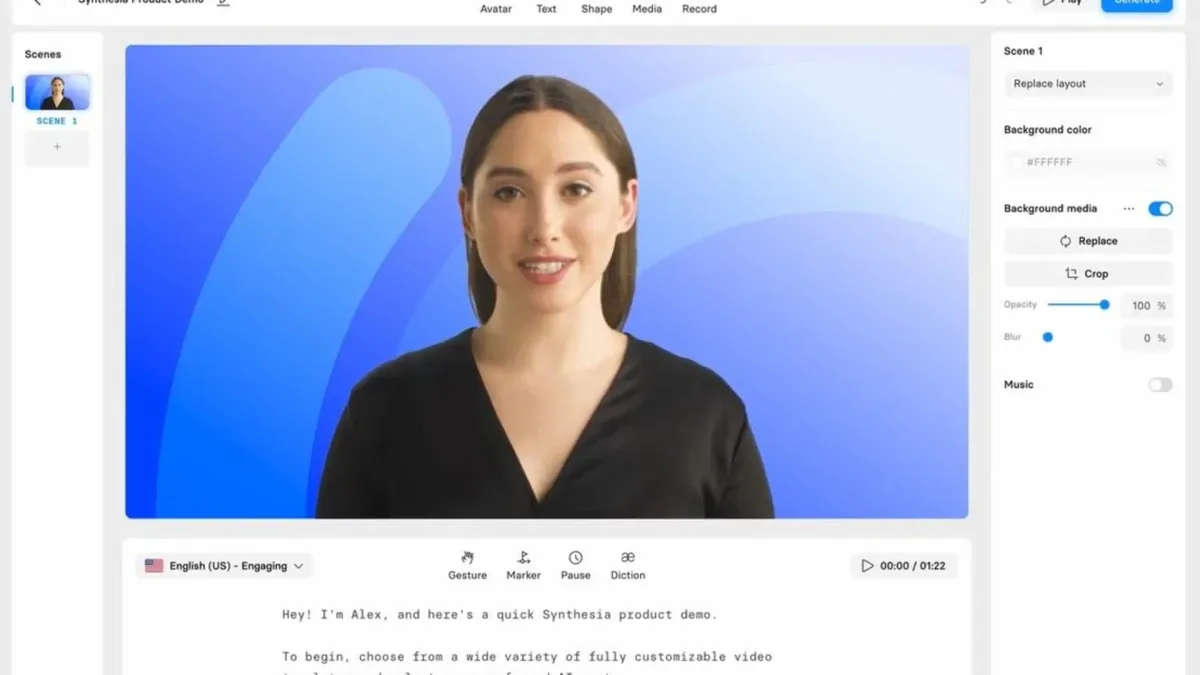
Synthesia is built for ultra-simplified operation, so even editing beginners can get up to speed fast. Here’s the basic step-by-step tutorial workflow:
1. Sign Up & Log In
- Register on the Synthesia website and start a free trial.
- Log in to access your Dashboard.
2. Create a New Video Project
- Click “Create Video.”
- Choose a template or start from blank.
3. Select Your AI Avatar
- Pick a character, adjust outfit, profession, and skin tone.
- Free plan: 6 avatars; paid plans: 70–230+.
4. Enter Your Script
- Paste your text; AI auto‐narrates with lip sync.
- Supports multiple languages and instant translation.
5. Design & Layout
- Drag in titles, subtitles, images, logos, and music.
- Use “Slides” to organise scenes.
6. Preview & Export
- Click “Preview” to review.
- Click “Generate Video” to export MP4.
- Higher plans can auto‐translate and export for social media.
7. Further Learning
- Explore Synthesia Academy’s courses and live demos for advanced tips.
Alternatives to Synthesia
In recent years, the AI video-generation market has exploded with powerful new contenders. If you’re looking to explore alternatives, here’s a comparison of the hottest AI video platforms of 2025 and their key features:
| Brand | Key Features | Languages Supported | Free Minutes | Starting Price |
| HeyGen | 100+ avatars, rapid generation | 40+ | 2 min | $24/month |
| DeepBrain AI | End‐to‐end text‐to‐video, auto subtitles & graphics | 80+ | 1 min | $30/month |
| Runway | Gen‐4 model, text/image‐to‐video, mixed media | 30+ | 1 min | $12/month |
| Kling | Physically realistic animation, commercial focus | 20+ | 1 min | $6.99/month |
| Google Veo | Up to 4K, smooth motion & complex effects | 15+ | 8 sec | $19.99/month |
| D-ID | AI face animation, photo lip‐sync | 50+ | 1 min | $5.99/month |
HeyGen and DeepBrain AI excel at training and marketing shorts; Runway shines in creative media mixing; Kling leads in realism; Google Veo targets high-end cinematic projects; D-ID specialises in animating photos.
Preserve Your Precious Memories with Capture’s Photo Album Digitisation Service
Do you have a box full of old photographs, worried that they may fade or get damaged over time? Now, you can preserve these treasured memories by digitising them with Capture.HK’s professional photo album digitisation service. Our service allows you to convert your old photos into high-quality digital files, ensuring they are safely stored and easily shareable.
At Capture.HK, we use high-resolution scanning technology to restore your photos with sharp details and vibrant colours, maintaining their original quality. We also offer various file formats, making it easy for you to access and share them across different devices. Most importantly, we handle your photos with utmost care, ensuring they are safely processed and preserved.
The Frame Digital Photo Frame
Want to relive your digital memories every day? Capture’s The Frame digital photo frame is the perfect solution! Designed to showcase your most cherished moments, The Frame allows you to display a lifetime of memories in one elegant frame.
With its sleek design and high-resolution display, The Frame offers an effortless way to organise and enjoy your favourite photos. Simply digitise your photo collection, upload them to The Frame, and enjoy your memories anytime, anywhere.
Whether placed in the living room, bedroom, or office, The Frame adds a touch of warmth and personality to your space. More than just a decorative item, it’s a meaningful gift that brings your treasured moments to life.
Get The Frame today and enjoy your memories every day!
References:
- Synthesia AI review (2025) - cybernews
- Synthesia Review 2025: Is The Best AI Video Editor? - vidmetoo
- Synthesia Pricing - tekpon
- The 40 Best AI Tools for 2025 (Tried and Tested) - synthesia
- I Tried Synthesia in 2025: Here’s What I Really Think - zebracat
Extended Readings:
- AI Video Watermark Removal: Technical Principles, Tool Comparison, and Practical Guide
- AI Photo Styles 2025: Technology Principles, Applications, and Tool Comparison
- AI Video Subtitles: How to Add Subtitles and Translate into Different Languages Effortlessly?
- Kling AI: Pros, Cons & Subscription Pricing (with Tutorial and Alternatives)
Loading...