Comprehensive Guide to UK Passport Photo Requirements: Size, Facial Rules, Head Coverings, and Digital Photo Specifications
Applying for a UK passport is a critical step for international travel, immigration, or identity verification, and a compliant passport photo is essential to a successful application. The HM Passport Office enforces very strict rules covering dimensions, facial expression, head coverings, digital formats, and other details to ensure photos work with biometric systems and accurately represent the applicant. In Hong Kong, many residents apply for UK passports (including British National (Overseas) passports, BN(O)) for travel, study, or work, so understanding these standards can prevent delays or rejections. Based on UK official guidance and Hong Kong resources, this article details photo size requirements, facial rules, head-covering restrictions, digital photo specs, and additional tips. Whether you go to a professional studio or do it yourself, you’ll learn how to produce photos that meet the standards and keep your application on track.
Photo Size Requirements
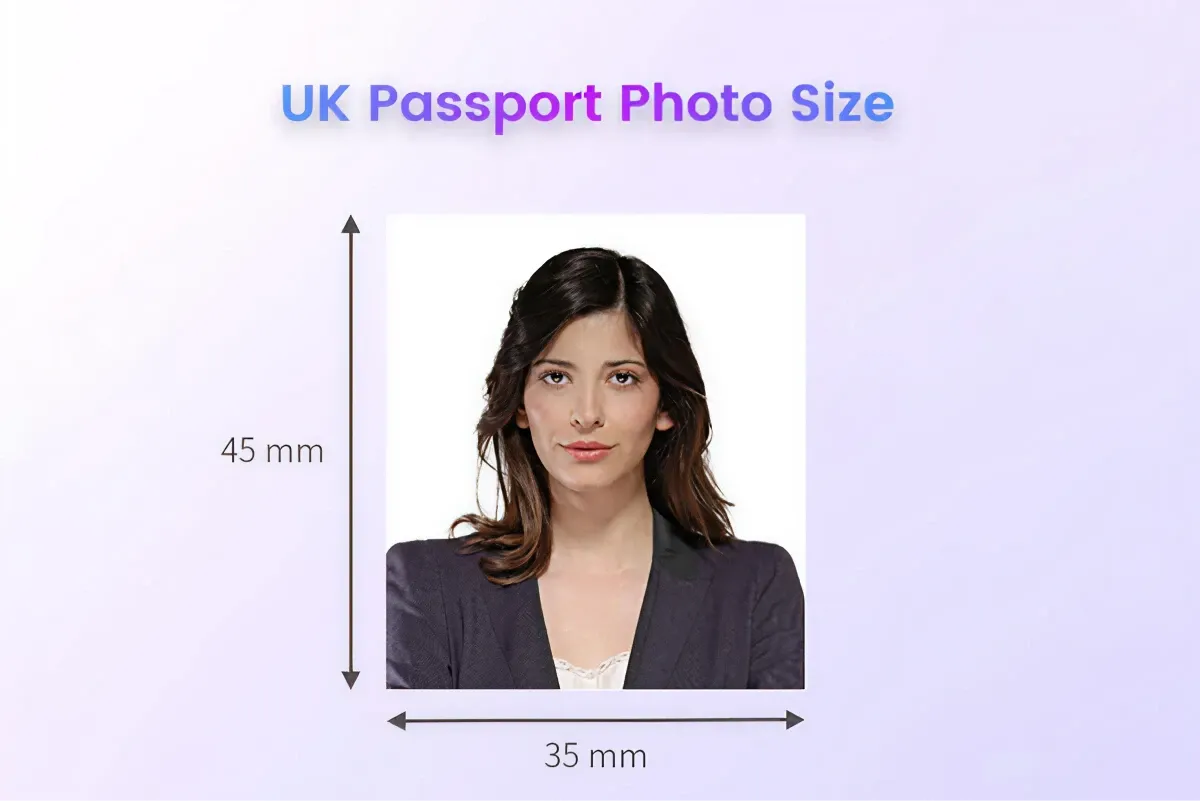
The HM Passport Office specifies exact dimensions for both printed and online applications:
- Printed photo size: 35 mm wide × 45 mm high
- Head height (chin to crown): 29 mm to 34 mm
- Space from crown to top edge: 3 mm to 5 mm
- Face must occupy about 70 %–80 % of the photo area
- Number of photos: two identical photos, taken within the last month, reflecting current appearance
- Print quality: glossy or matte photo paper, at least 600 dpi; no creases, smudges, scratches, or borders
Recommendation: When applying in Hong Kong (including for BN(O) passports), check the British Consulate-General website (www.gov.uk/world/organisations/british-consulate-general-hong-kong) or the HM Passport Office site (https://www.gov.uk/photos-for-passports) for any updates. For infants, measure printed photos with a ruler to verify correct head proportions. Use a professional studio or high-resolution printer to ensure sharpness.
Facial Requirements
To ensure compatibility with biometric systems, photos must meet these facial expression and posture rules:
- Expression: Neutral with lips closed—no smiling, frowning, or exaggerated expressions. Eyes open, looking directly at the camera with no obstruction (no hair across the face, no glare).
- Posture: Head straight and centered, not tilted more than 15 °. Shoulders level, showing the upper torso and neck.
- Glasses: Allowed if frames do not cover the eyes and lenses are free of glare, tint, or reflections. Sunglasses or tinted lenses are not permitted. It is recommended to remove glasses to simplify processing.
- Clarity: Photo must be crisp—no blur, overexposure, underexposure, red-eye, or shadows. Skin tone should appear natural.
- Others: Hair must not cover eyebrows or eyes. Showing ears is recommended but not mandatory. Long hair should be tied back to avoid covering the face or photo edges.
Tip: Use even lighting (natural window light or a ring light) to avoid shadows or red-eye. When photographing infants, use toys or sounds to draw their gaze straight at the camera. Photographers in Hong Kong familiar with UK requirements can provide expert guidance.
Head-Covering Requirements
Rules for head coverings are an important consideration, especially for religious, cultural, or medical reasons:
- General rule: No fashion headgear (hats, headbands, or non-essential accessories) that might interfere with facial recognition or cast shadows.
- Religious or medical coverings: Permitted (e.g., hijab, Sikh turban, medical bandage) provided that facial features—from the chin to the forehead and both sides of the face—are fully visible with no shadows or obstruction.
- Jewellery: Small earrings are allowed if they do not obscure the face or alter its shape; large or face-covering accessories must be removed.
Recommendation: If you wear a religious or medical head covering, include a brief written statement (e.g., a letter from your place of worship or a doctor’s note) with your application to the HM Passport Office or British Consulate. Before photographing, check that the head covering does not cast shadows, especially over the forehead or eyes.
Digital Photo Requirements
For online renewals or BN(O) applications, you must upload a digital photo meeting these specifications:
- Size and Pixel dimensions:
- Pixel dimensions: Minimum 600 × 750 pixels; recommended 1200 × 1600 pixels for high clarity
- Head size: Face should occupy 70 %–80 % of the image; head height roughly 29 mm–34 mm (about 500–600 pixels)
- Eye position: 50 %–70 % up from the bottom of the image (about 400–525 pixels)
- File format: JPEG or PNG only; file size between 50 KB and 10 MB; RGB 24-bit colour
- Background and quality: Plain white, light gray, or off-white background; no borders, shadows, patterns, or objects. No overexposure, underexposure, or red-eye; natural skin tone required.
- Submission: Upload via the HM Passport Office online application system (www.gov.uk/apply-renew-passport). If online submission fails, you must supply two printed photos at a designated location (e.g., the UK Visa Application Centre in Hong Kong).
Tips: Use free online tools like the UK Passport Photo Tool (www.gov.uk/photos-for-passports) or PhotoAiD (photoaid.com) to auto-crop and adjust your background. Before uploading, verify file size and resolution, and keep printed copies on hand in case of system errors.
Other Considerations
To ensure your photo passes inspection, keep these extra guidelines in mind:
- Clothing: No uniforms (military or religious) or reflective fabrics. Wear everyday clothes that contrast with the background (e.g., dark colours). Avoid white or light gray.
- Infant photos: The child must be alone in the frame—no toys, hands, or other people. Newborns may lie on a white sheet with their head straight; older babies may sit in a high chair against a white or light background. Ensure eyes are open and looking at the camera.
- Photo currency: Photos must be taken within one month. If your appearance has changed significantly (surgery, major weight change, or gender transition), you must retake the photo. Minor hairstyle changes (e.g., hair colouring) or natural aging are acceptable.
- Photo environment:
- Use bright, even lighting (window light or ring light); avoid direct flash or outdoor glare.
- Keep the camera 1.5–2 m from the subject, with the lens at eye level, and use a tripod for stability.
- Background must be pure white, light gray, or off-white; you may use a white backdrop or wall, ensuring there are no patterns or shadows.
- DIY vs Professional Studio:
- DIY: Use a high-resolution smartphone (12 MP+) or digital camera and free editing tools (Photopea, Snapseed, Canva). Print on quality photo paper; local Hong Kong print shops charge about HK$10–20 per print.
- Professional Studio: Quick ID photo services in Hong Kong cost about HK$50–150 and are well versed in UK requirements—ideal for applicants under time pressure.
- Common mistakes:
- Using filters or heavy retouching, low resolution;
- Incorrect background colour or shadows;
- Wrong head proportions, or face covering by hair or accessories.
- Submitting expired photos (older than one month) will also lead to rejection.
Tips for Hong Kong People: When applying for a UK or BN(O) passport in Hong Kong, contact the British Consulate-General (+852 2901 3000) or visit www.gov.uk/overseas-passports to confirm the latest requirements. After a DIY shoot, you can have your photos prechecked at the UK Visa Application Centre (in North Point), or use a professional studio to ensure full compliance.
Preserve Your Precious Memories with Capture’s Photo Album Digitisation Service
Do you have a box full of old photographs, worried that they may fade or get damaged over time? Now, you can preserve these treasured memories by digitising them with Capture.HK’s professional photo album digitisation service. Our service allows you to convert your old photos into high-quality digital files, ensuring they are safely stored and easily shareable.
At Capture.HK, we use high-resolution scanning technology to restore your photos with sharp details and vibrant colours, maintaining their original quality. We also offer various file formats, making it easy for you to access and share them across different devices. Most importantly, we handle your photos with utmost care, ensuring they are safely processed and preserved.
The Frame Digital Photo Frame
Want to relive your digital memories every day? Capture’s The Frame digital photo frame is the perfect solution! Designed to showcase your most cherished moments, The Frame allows you to display a lifetime of memories in one elegant frame.
With its sleek design and high-resolution display, The Frame offers an effortless way to organise and enjoy your favourite photos. Simply digitise your photo collection, upload them to The Frame, and enjoy your memories anytime, anywhere.
Whether placed in the living room, bedroom, or office, The Frame adds a touch of warmth and personality to your space. More than just a decorative item, it’s a meaningful gift that brings your treasured moments to life.
Get The Frame today and enjoy your memories every day!
References:
- Photos for passport - gov.uk
- Photo requirements - gov.uk
- Passport Photo Guidance - HM Passport Office
- Applying for a passport from outside the UK: guidance notes (accessible) - gov.uk
- 【Baby ID Photos】Can’t get a good shot of your baby’s ID photo no matter what? Here are 3 top tips for nailing your baby’s passport photo! – photobi
Extended Readings:
- Complete Guide to Vietnam Visa Photo Requirements: Dimensions, Facial Features, Headwear & Digital Standards
- Complete Guide to Indian Visa Photo Requirements: Size, Facial Features, Headwear & Digital Standards
- Complete Guide to Japanese Visa Photo Requirements: Size, Facial Expression, Headwear & Digital Photo Standards
Loading...